PillRemind
A native Android medication reminder. The alarm rings every time, which is the part Android makes hardest.
What it is
A medication reminder for Android. It holds several medicines, each with its own set of daily dose times, and when one comes due it rings a real alarm. It shows over the lock screen, plays on the alarm audio stream and is loud enough to wake someone. You stop it with the buttons on screen or with the volume or power keys, the way you'd stop any other alarm on the phone. Design and code are both mine, from the schedule maths to the alarm screen.
Why it had to be native
The first version was Expo and React Native, and most of it worked. It could not ring reliably. All four problems below sit at the boundary between the app and the operating system, which is where a JavaScript bridge cannot reach, so I rewrote the app in Kotlin.
Android 14 downgraded the full-screen intent
A full-screen intent is what lets an alarm take over the screen instead of sliding in as a notification. In Android 14 that permission was restricted to alarm and calling apps, and a sideloaded app like mine no longer qualified. The alarm quietly became a silent notification.
A foreground service now owns the ringing and posts the full-screen intent, which is the path manufacturers allow most reliably.
Manufacturers ignored showWhenLocked
OxygenOS, MIUI and One UI each block apps from launching an activity in the background or drawing over the keyguard. The flag that is supposed to put a screen in front of a locked phone simply did nothing on the phones I own.
The alarm screen sets the window flags in code and in the manifest, and is started from a foreground service rather than from a broadcast receiver.
Notification actions demanded the PIN
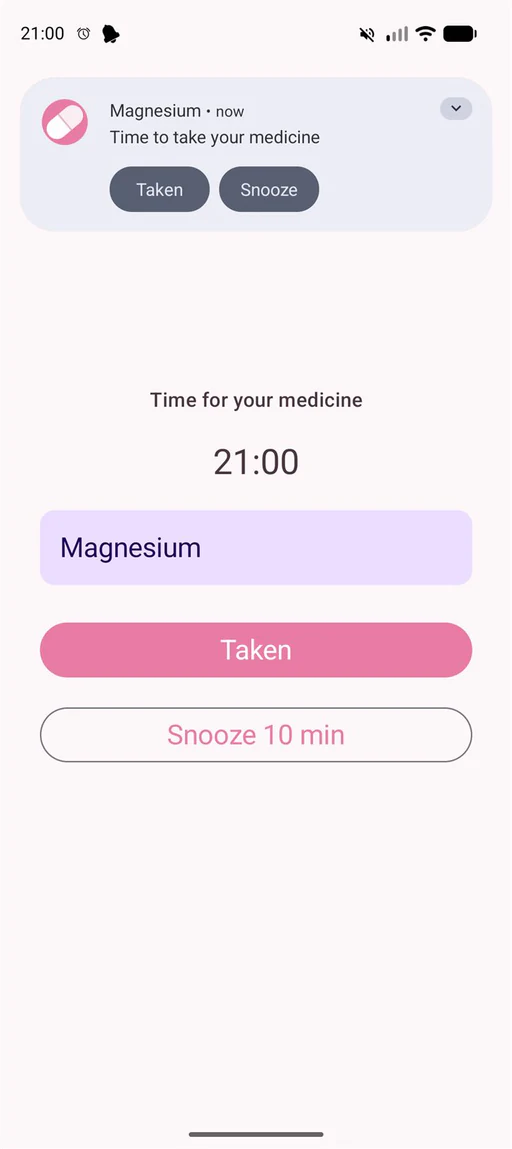
Acting on the notification meant unlocking first. That is correct behaviour for a secure lock screen, and completely wrong at three in the morning with a phone in one hand.
Taken and Snooze live inside the app's own alarm screen, which is already showing over the keyguard, so nothing asks for a PIN.
The hardware buttons could not stop it
Every other alarm on the phone stops when you hit volume or power. React Native gave me no clean way to capture those keys, so mine was the one alarm you had to look at the screen to silence.
Native Kotlin owns the key-event and audio pipeline directly, so volume and power silence it like anything else.
How it fires
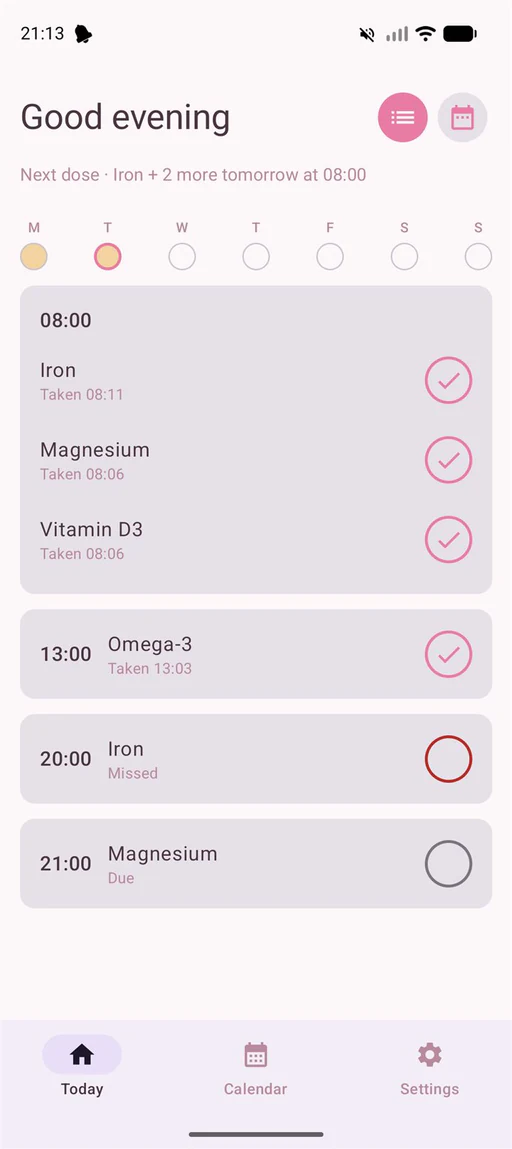
AlarmScheduler registers each alarm with setAlarmClock, the one scheduling call manufacturers rarely defer, and arms it about three days ahead. When one comes due, a broadcast receiver starts a foreground service, which owns the looping sound on the alarm stream, takes the wake lock and audio focus, and posts the full-screen-intent notification. That notification opens the alarm screen, which shows over the keyguard and captures the hardware keys.
One dose, up to six triggers
- T−30 pre-reminder
- T−5 pre-reminder
- T the alarm
- T+10 re-alarm
- T+20 re-alarm
- T+30 re-alarm
Two pre-reminders, the alarm itself, then three re-alarms if it goes unanswered. Snooze consumes the next re-alarm slot instead of adding one, so a dose can never ring more than four times.
Built to stay testable
The scheduling logic lives in a layer with no Android imports at all. Pure Kotlin. Trigger times, timezone anchoring, what DST does to a dose at the wrong hour, how a snooze eats one of its own re-alarm slots. All of it runs and is tested without a device in the loop, and everything touching the OS is a thin adapter on top. The split came out of the prototype, where the pure scheduling code was the only part that kept working while everything sitting on the native bridge did not.
Stack
Role
Design & build
Status
Personal project, sideloaded
Year
2026